India-Based Data Entry Outsourcing Support Serving USA, Canada, UK, Australia, Europe, New Zealand, Singapore, UAE
Remote Desktop Data Entry

Remote Desktop Data Entry Services for Work That Must Stay Inside the Client’s Controlled Environment

When records must remain inside a client environment, production has to adapt to the system rather than exporting the data for convenience. Our professional remote desktop service maps the screens, save sequence and completion evidence inside RDP, VDI, Citrix or an approved cloud workspace.

Each offshore operator receives a named, restricted role. Clipboard use, downloads, local storage and prohibited actions are governed by the client, and a dropped session is handled through a tested recovery rule instead of repeating the record blindly.

Before you outsource live-system entry, an expert pilot measures latency, validation behaviour, audit visibility and partial-save risks. That evidence produces a workable solution; remote access by itself is never presented as proof of security.

Shri Data Entry Services team working on Remote Desktop Data Entry Services projects
5000+ Completed Projects
90% Returning Clients
16+ Years Experience
45+ Countries Served
50+ Professionals Team
Services We Offer

Remote system work must be designed around permissions, latency and recovery

  • Named environment and owner confirmed
  • Minimum role permissions established
  • Permitted copy and download actions listed
  • Session and time-zone rules documented
  • Save and recovery behaviour tested
  • Audit and access removal planned

Working through a remote desktop changes the production method. Operators may need to navigate several screens, wait for system responses, work around session time-outs and save records in a specific order. Those factors affect capacity and error risk even when the underlying fields are familiar.

The client should provide a role created for the defined task rather than a shared privileged account. The workflow lists screens, fields and actions that are permitted, as well as functions such as deletion, export, approval or user administration that remain prohibited.

Remote login data entry also needs recovery rules. If a connection drops after partial entry, the operator must know how to determine whether the record saved, how to avoid duplicates and where to report a system problem. These details are tested during the pilot.
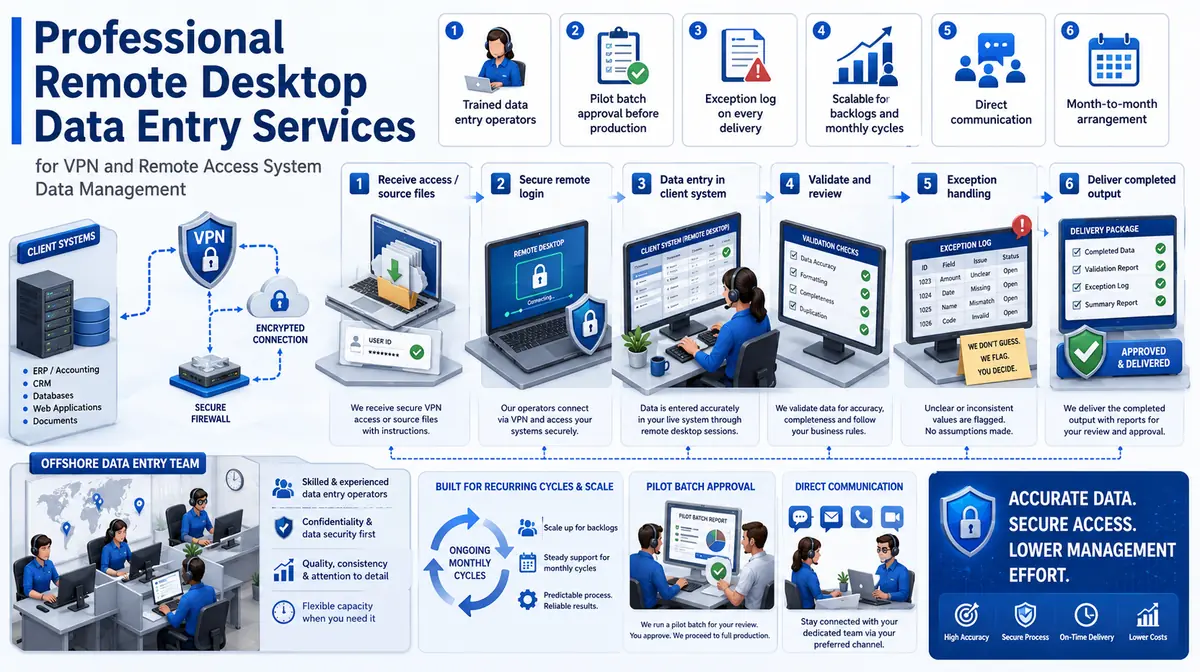

Structured entry across remote desktops, virtual applications and secure portals

Access is assessed per system and task; not every function is made available to production users.

01

RDP data entry

Records are entered through a client-approved Remote Desktop Protocol session using named roles, screen-level instructions and session controls.

02

VDI and Citrix data entry

Virtual desktop or published applications are used within the client environment, with clipboard, download and local-storage rules documented.

03

ERP remote data entry

Approved master or transaction-support fields are entered without release, posting or administrative authority unless explicitly included.

04

CRM remote data entry

Contacts, accounts, activities and approved updates are maintained under ownership, duplicate and restricted-field rules.

05

Secure portal data entry

Forms, records and attachments are entered through approved portals, with submission and draft authority kept distinct.

06

Cloud desktop data entry

Client-managed cloud workspaces support defined data processing while access, logging and file movement remain controlled by the environment owner.

Business System Compatibility

Remote Desktop Data Entry Services: Direct Integration and Software Compatibility

Outputs are prepared around the field structure, controlled values and import requirements of your destination environment. Files can be delivered for review, staging or authorised import without forcing your team to rebuild the completed work.

Supported destinations

Structured output for the platforms your team already uses

Files are mapped to the client’s approved template, naming rules, identifiers and system structure before full production begins.

  • Microsoft ExcelControlled worksheets and import tables
  • Google SheetsShared review and operational files
  • SharePointLists, libraries and metadata columns
  • SalesforceCRM objects and approved fields
  • ERP / CRM SystemsClient-defined import templates
  • Custom SQLStaging and relational tables
Source continuity

References stay connected

Source IDs, filenames, record keys and approved relationships remain available for review and downstream traceability.

Import control

Fields are mapped before production

Mandatory fields, formats, controlled values, character limits and relationship keys are checked against the destination specification.

Pilot validation

Test the handoff with a representative batch

Rejected rows, unsupported values and mapping conflicts are returned with exact references so approved corrections can be incorporated before full-volume delivery.

Delivery formatsStructured for review, staging or import
  • CSV
  • XLSX
  • XML

Column order, encoding, date rules, multi-value handling and destination-specific requirements can follow the receiving system’s approved specification.

Compatibility means SDES prepares outputs to specifications supplied or approved by the client. Product names identify commonly used destination systems and do not imply endorsement, certification or partnership.

Process, Quality and Security

How remote access becomes a controlled production method

1. Assess Environment and Policy

The client confirms the remote technology, owner, geographic restrictions and permitted operating model.

2. Create Minimum Access

Named roles expose only the screens, fields and actions required for the agreed workflow.

3. Document Screen Actions

Navigation, save order, prohibited functions and evidence of completion are recorded step by step.

4. Test Failure Scenarios

A pilot checks time-outs, connection loss, duplicate warnings and recovery from partially completed records.

5. Operate Controlled Sessions

Approved users process the queue within agreed windows and record system or data exceptions.

6. Review and Revoke

Access, logs, incidents and scope are reviewed periodically and permissions are removed when no longer required.

The system remains the source and destination, so completion evidence must be designed separately

A task log should confirm processed references without exporting data the client intends to keep inside the environment.

📂 Source formats we accept
  • Client-hosted source records
  • Approved remote environment
  • Screen and field guide
  • Named user role
  • Update or work queue
  • Exception contact path
📤 Delivery formats
  • Updated client-system records
  • Session task log
  • Record reference list
  • Held and failed-item queue
  • Access incident report
  • Completion summary

Testing should cover session drops, duplicate warnings, slow screens, locked records, unavailable fields and draft-versus-submit behaviour.

Field checks operate inside the client system and respect its validations. A saved record is not assumed correct; required references, status and exception evidence still need review.

Security controls may include named users, multi-factor authentication, approved locations, clipboard restrictions, disabled downloads and session logging. The client determines which controls are available and required.

No remote-access method is described as risk-free. The scope documents technical dependencies, access responsibilities, recovery steps and actions outside the production role.

🔒 NDA Protected Before files are shared
🌐 GDPR Aware EU data handling
Defined Quality Target Confirmed by pilot
🛡️ Secure Transfer Encrypted file access
📋 Exception Log Every delivery
👥 Project Team Only Controlled access
Free accuracy test

Does the work need to remain inside your ERP, CRM or virtual desktop?

Describe the environment, required screens, task volume, permitted actions and geographic or session restrictions. We will assess operational fit before requesting access.

✓ No credit card required✓ No contract required✓ 24–48 hour return
Review Remote Desktop Entry
Source sampleyour_sample_data.csv
Received
Verified deliveryverified_output.xlsx
Reviewed
▣ Encrypted transfer◉ Quality controlled
Why Outsource to SDES?

Why companies outsource controlled system entry without exporting the underlying records

Remote Desktop Data Entry Services workflow and quality review
  • Professional screen-level guides
  • Expert review of failure and recovery paths
  • Offshore capacity within approved windows
  • Named restricted roles
  • No unapproved local storage
  • Client retains environment and audit ownership

A remote desktop data entry solution can reduce file movement, but security depends on configuration and conduct. SDES follows the client’s role, session and data-movement controls rather than treating a remote connection as automatic protection.

Clients continue to own the environment, credentials, logs and permissions. Our team applies the approved workflow and reports access or data exceptions, allowing organisations to outsource routine client-system data entry without delegating system administration.

Start Your Project →
Industries We Support

Remote entry for environments where records remain under client control

Healthcare Administration

Approved non-clinical records in controlled applications.

Finance Operations

Restricted transaction-support entry without posting or payment authority.

Logistics

Shipment and carrier records in client operations platforms.

Property

Portfolio and document status entry in hosted systems.

Manufacturing

Asset, supplier and production-support records in ERP environments.

Business Software

CRM and operational records maintained through controlled virtual access.

Case Studies

Relevant Project Experience

Hosted ERP Asset Updates

Project Name
Hosted ERP Asset Updates
Volume
36,439 records per month
Problem
Records could not leave the hosted ERP, and shared administrator access exposed unnecessary functions.
Solution
A restricted role allowed specified asset fields only, with a separate queue for master-data decisions.
Outcome
The proposed offshore model supported routine entry while the client retained release, deletion and user administration.
Title
ERP Governance Manager
Industry
Manufacturing
Country
Germany

Secure CRM Activity Entry

Project Name
Secure CRM Activity Entry
Volume
32,026 records per month
Problem
Source notes had to remain within a managed cloud desktop and session drops risked duplicate activities.
Solution
Record checks and save-state verification were added before retrying interrupted work.
Outcome
The professional sales operations team received current activity records and a visible list of failed sessions.
Title
Revenue Operations Lead
Industry
Business Software
Country
United States

Property Portal Status Queue

Project Name
Property Portal Status Queue
Volume
23,172 records per month
Problem
Only selected status and document fields could be updated through a client portal.
Solution
Screen-level instructions separated drafts, submissions and fields reserved for property managers.
Outcome
The expert managers handled exceptions while routine portal updates stayed inside the controlled environment.
Title
Property Systems Director
Industry
Real Estate
Country
Australia
FAQs

Questions about remote desktop data entry

Which remote access systems can be supported?

Potentially RDP, VDI, Citrix, browser portals and client-managed cloud desktops. Suitability depends on policy, permissions, geographic restrictions and technical performance.

Should we provide a shared account?

Named, least-privilege users are preferable because they support accountability and access removal. Credential management should follow the client’s security policy.

What happens if the connection fails mid-record?

The pilot establishes how to verify save state, avoid duplicate entry, record the affected reference and escalate persistent system problems.

What should a Remote Desktop Data Entry Services pilot contain?

Provide Client-hosted source records, Approved remote environment, Screen and field guide. The pilot should include ordinary records and known exceptions so field interpretation, review rules and delivery structure can be confirmed before production.

📩 Assess Remote Access
💬