
India-Based Data Entry Outsourcing Support Serving USA, Canada, UK, Australia, Europe, New Zealand, Singapore, UAE
Online Data Entry

Online Data Entry Services for Controlled Updates Inside CRMs, Portals and Business Systems

Saving one field in a live system can trigger automation, change a customer view or create a new relationship. Professional online data entry therefore starts with the consequence of the action, not only the text shown on the screen.

Client-approved roles limit the offshore operator to documented records, fields and submission steps across portals, CRMs and commerce platforms. Configuration, deletion, payment and recovery authority stay with the system owner.

Clients outsource repeatable updates after testing normal, duplicate and invalid cases. The expert solution combines restricted access with validation checkpoints and a clear instruction for records that must remain unsubmitted.

Shri Data Entry Services team working on Online Data Entry Services projects
5000+ Completed Projects
90% Returning Clients
16+ Years Experience
45+ Countries Served
50+ Professionals Team
Services We Offer

Every click, lookup and submission should be inside the approved operating boundary

  • System role restricted
  • Objects and actions documented
  • Automation effects understood
  • Duplicate checks performed
  • Test records approved
  • Escalation and recovery defined

A field is not isolated inside a live system. Updating status can trigger messages, changing an owner can alter queues and creating a contact can affect account history. These dependencies are reviewed before operators work in production.

The client defines the approved role, records, fields and actions. Administrative settings, exports, payments, deletions and bulk changes remain unavailable unless specifically required and authorised.

Where possible, a sandbox, training account or limited pilot set is used first. If the system has no safe test area, production begins with a small monitored batch and an agreed recovery path.
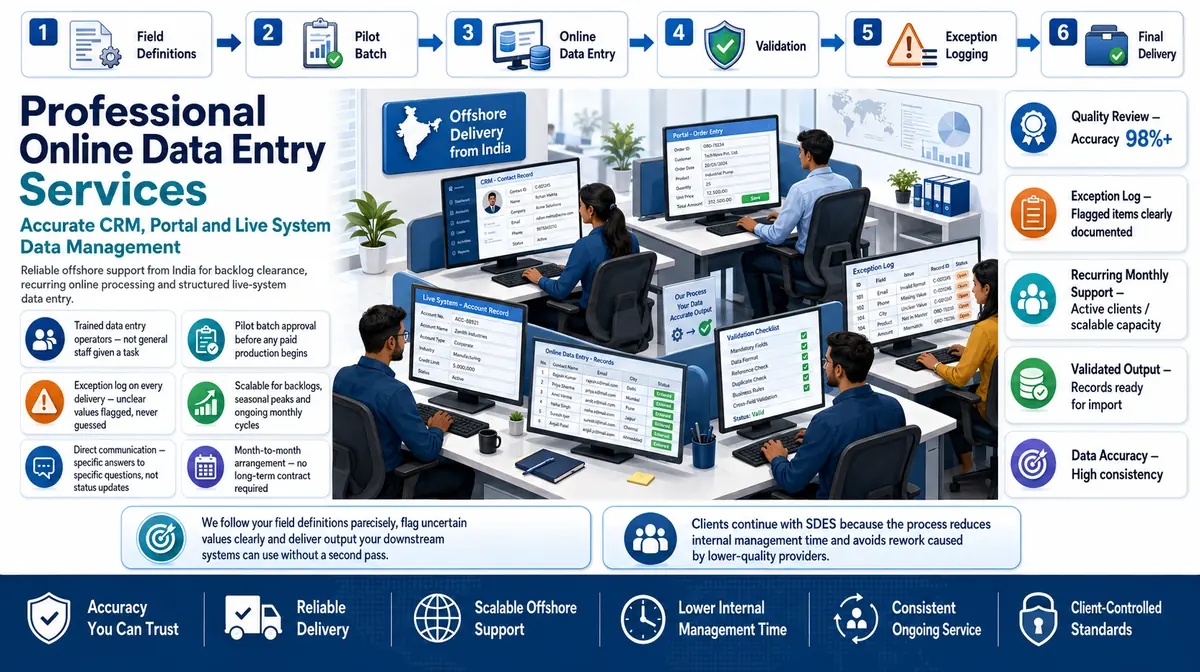

Repeatable entry and maintenance inside approved web systems

SDES operates within supplied permissions and does not expand the task by assumption.

01

CRM record entry

Contacts, accounts, leads and approved custom fields are added or updated with ownership, duplicate and relationship rules applied.

02

Web portal data entry

Forms, applications, listings and status information are entered through client or third-party portals using documented submission steps.

03

eCommerce administration

Approved product, inventory and catalog fields are maintained without access to payments, tax, promotions or unrelated store settings.

04

ERP and operations systems

Customer, supplier, item and transaction-support records are entered under limited roles while operational and financial approval stays internal.

05

Online directory and CMS entry

Approved profiles, content fields, metadata and categories are populated without making unsupported publishing or policy decisions.

06

Recurring database maintenance

Scheduled additions and updates follow source, cut-off, audit and exception rules established with the system owner.

CRM Software Compatibility

Online Data Entry Services: Direct Integration and Software Compatibility

Outputs are prepared around the field structure, controlled values and import requirements of your destination environment. Files can be delivered for review, staging or authorised import without forcing your team to rebuild the completed work.

Supported destinations

Field-mapped records for customer and sales platforms

Files are mapped to the client’s approved template, naming rules, identifiers and system structure before full production begins.

  • SalesforceObjects, owners and custom fields
  • HubSpotContacts, companies and deals
  • Zoho CRMModules and approved layouts
  • Dynamics 365Entities and relationship keys
  • PipedrivePeople, organisations and pipelines
  • Custom CRM / SQLStaging and import tables
Source continuity

References stay connected

Source IDs, filenames, record keys and approved relationships remain available for review and downstream traceability.

Import control

Fields are mapped before production

Mandatory fields, formats, controlled values, character limits and relationship keys are checked against the destination specification.

Pilot validation

Test the handoff with a representative batch

Rejected rows, unsupported values and mapping conflicts are returned with exact references so approved corrections can be incorporated before full-volume delivery.

Delivery formatsStructured for review, staging or import
  • CSV
  • XLSX
  • JSON

Column order, encoding, date rules, multi-value handling and destination-specific requirements can follow the receiving system’s approved specification.

Compatibility means SDES prepares outputs to specifications supplied or approved by the client. Product names identify commonly used destination systems and do not imply endorsement, certification or partnership.

Process, Quality and Security

How direct system work is introduced safely

1. Map the User Journey

Screens, fields, lookups, validation and submission effects are documented step by step.

2. Restrict the Account

The client provides the minimum objects, records and actions required for the task.

3. Test Known Scenarios

Normal, duplicate, missing and invalid records are used to confirm handling.

4. Approve a Small Live Batch

Initial entries are monitored before broader production access is used.

5. Operate and Log

Operators complete approved actions and record system errors or held items.

6. Review Access and Results

The client reviews output, permissions and exceptions as the workflow evolves.

Online entry uses the client’s system as the destination and audit environment

📂 Source formats we accept
  • Approved user account or virtual desktop
  • System workflow and field guide
  • Source files or update queue
  • Permission and prohibited-action list
  • Test cases and escalation contacts
📤 Delivery formats
  • Completed approved system records
  • Submission or activity log
  • Rejected and held record queue
  • Duplicate and validation exceptions
  • Batch completion summary
Free accuracy test

What can the online user account see and change?

Share a workflow demonstration, permission model and representative update cases. We will identify the actions, dependencies and holds that must be documented.

✓ No credit card required✓ No contract required✓ 24–48 hour return
Discuss System Entry
Source sampleyour_sample_data.csv
Received
Verified deliveryverified_output.xlsx
Reviewed
▣ Encrypted transfer◉ Quality controlled
Why Outsource to SDES?

Why businesses outsource online updates through limited roles

Online Data Entry Services workflow and quality review
  • Minimum necessary permissions
  • Step-by-step system guide
  • Duplicate checks before creation
  • Automation effects documented
  • Expert recovery retained
  • Offshore recurring capacity

Professional online entry can keep business systems current without providing broad administrative control. The client remains the system owner and decides configuration, deletion, approval and recovery.

Our offshore operators handle approved repeatable actions. Expert system questions and records outside the rule set are returned rather than pushed through validation with placeholders.

Start Your Project →
Industries We Support

Online record maintenance across business platforms

CRM and Sales

Contacts, accounts and leads maintained under ownership and duplicate controls.

eCommerce

Product and catalog fields updated with commercial settings excluded.

Logistics

Shipment and document status entered under operational permissions.

Finance Administration

Transaction-support data entered without approval or payment authority.

Healthcare Administration

Approved records handled under client access and privacy requirements.

Property Platforms

Listings and portfolio fields maintained from authorised sources.

Case Studies

Relevant Project Experience

Restricted CRM Contact Updates

Project Name
Restricted CRM Contact Updates
Volume
28,128 records per month
Problem
Contacts needed maintenance, but ownership and possible duplicates required internal decisions.
Solution
A restricted role covered approved fields; ownership conflicts and possible matches were held.
Outcome
The model allowed routine updates without granting administrative or merge authority.
Title
CRM Governance Lead
Industry
Business Software
Country
United States

Supplier Portal Submission

Project Name
Supplier Portal Submission
Volume
14,651 records per month
Problem
Portal validation required exact formats and rejected incomplete evidence.
Solution
Submission steps and hold conditions were documented, with unsupported applications left unsubmitted.
Outcome
The solution produced an activity log and focused exception queue.
Title
Vendor Operations Manager
Industry
Facilities Services
Country
United Kingdom

Marketplace Catalog Maintenance

Project Name
Marketplace Catalog Maintenance
Volume
48,778 records per month
Problem
Catalog fields needed changes without exposing payment or store configuration.
Solution
Product-only permissions and prohibited-action rules limited the offshore account.
Outcome
The professional workflow supported expert merchandising review while routine changes were processed.
Title
Marketplace Systems Lead
Industry
Retail
Country
Singapore
FAQs

Questions about online data entry

Do we need to provide administrator access?

No. Access should be limited to the records and actions required. Administrative settings and unrelated capabilities should remain unavailable.

Can your team work through our VPN or virtual desktop?

Potentially, subject to technical compatibility and client security approval. The setup is tested before production.

What happens when the system rejects a record?

The error and record reference are documented. Operators follow approved correction rules or hold the item for the system owner.

Which items are held for client review during Online Data Entry Services?

On Online Data Entry Services engagements, unreadable values, conflicting identifiers and decisions outside the approved guide are kept separate from clean structured document records. Every held item retains its source reference for the authorised reviewer.

📩 Review an Online Workflow
💬