India-Based Data Entry Outsourcing Support Serving USA, Canada, UK, Australia, Europe, New Zealand, Singapore, UAE
Salesforce Data Entry

Salesforce Data Entry Services for Standard Objects, Custom Relationships and Controlled Bulk Updates

A Salesforce file does not become safe merely because every column has a header. Record types can alter required fields, external IDs determine whether an upsert reaches the right record and one changed value may activate validation, assignment or flow logic inside the organisation.

For that reason, we treat the client org as the specification. Professional preparation covers object order, lookups, picklists, owners, custom relationships and automation-sensitive actions before offshore production begins. Leads, accounts, contacts, opportunities, products and custom objects then follow their own loading sequence.

Administrators can outsource bulk files, migration preparation, cleansing or ongoing record queues without giving away org governance. Expert Salesforce owners approve configuration and commercial changes; SDES supplies a reconciled data-entry solution with failed and ambiguous rows kept outside accepted batches.

Shri Data Entry Services team working on Salesforce Data Entry Services projects
5000+ Completed Projects
90% Returning Clients
16+ Years Experience
45+ Countries Served
50+ Professionals Team
Services We Offer

Salesforce data entry must follow the client’s objects, validation and automation

  • Object and record type confirmed
  • External IDs and lookups mapped
  • Required and conditional fields documented
  • Picklist values matched exactly
  • Automation-sensitive fields identified
  • Owner and sharing context retained

Two Salesforce organisations can use the same object name in different ways. Custom fields, record types, validation rules, flows and managed packages change what a valid record means. The working map must come from the client org.

Relationships may depend on Salesforce IDs, external IDs or approved matching rules. Contacts must attach to the correct accounts, opportunities to the right customer and custom records to their intended parents. Ambiguous lookups are held rather than attached by name alone.

Bulk updates can trigger flows, assignment, notifications or other automation. The client identifies fields and operations that may activate downstream behaviour, and test batches are reviewed before production volumes.
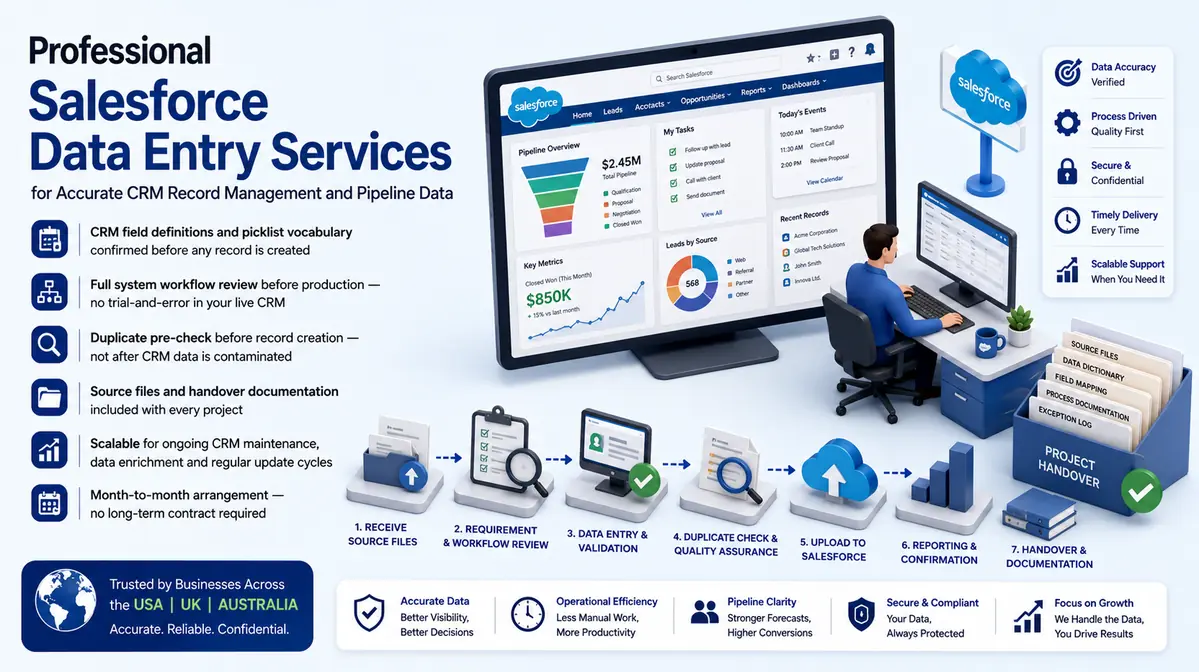

Structured entry across standard objects, custom objects and commercial records

Every batch is designed around the client’s Salesforce configuration and permitted actions.

01

Lead data entry

Approved lead details, sources, owners and statuses are entered without making qualification or routing decisions outside supplied rules.

02

Contact and account entry

People, companies, hierarchies and relationship fields are maintained using approved IDs and existing-record checks.

03

Opportunity data entry

Supported values, dates, owners, products and stages are entered while forecast and commercial judgement remain internal.

04

Custom object data entry

Client-specific objects and relationships are populated according to record types, field definitions and validation behaviour.

05

Salesforce bulk data upload

Create, update and upsert files are prepared with explicit keys, accepted picklists and testable object sequences.

06

Product and price book entry

Approved products, price books, entries and opportunity relationships are maintained without deciding commercial terms.

CRM Software Compatibility

Salesforce Data Entry Services: Direct Integration and Software Compatibility

Outputs are prepared around the field structure, controlled values and import requirements of your destination environment. Files can be delivered for review, staging or authorised import without forcing your team to rebuild the completed work.

Supported destinations

Field-mapped records for customer and sales platforms

Files are mapped to the client’s approved template, naming rules, identifiers and system structure before full production begins.

  • SalesforceObjects, owners and custom fields
  • HubSpotContacts, companies and deals
  • Zoho CRMModules and approved layouts
  • Dynamics 365Entities and relationship keys
  • PipedrivePeople, organisations and pipelines
  • Custom CRM / SQLStaging and import tables
Source continuity

References stay connected

Source IDs, filenames, record keys and approved relationships remain available for review and downstream traceability.

Import control

Fields are mapped before production

Mandatory fields, formats, controlled values, character limits and relationship keys are checked against the destination specification.

Pilot validation

Test the handoff with a representative batch

Rejected rows, unsupported values and mapping conflicts are returned with exact references so approved corrections can be incorporated before full-volume delivery.

Delivery formatsStructured for review, staging or import
  • CSV
  • XLSX
  • JSON

Column order, encoding, date rules, multi-value handling and destination-specific requirements can follow the receiving system’s approved specification.

Compatibility means SDES prepares outputs to specifications supplied or approved by the client. Product names identify commonly used destination systems and do not imply endorsement, certification or partnership.

Process, Quality and Security

How source data becomes controlled Salesforce records

1. Profile Objects and Record Types

Standard and custom objects, fields, record types and relationships are mapped.

2. Choose IDs and Actions

Salesforce IDs, external IDs and create, update or upsert behaviour are confirmed.

3. Map Validation and Automation

Required fields, picklists, rules and flow-sensitive updates are identified.

4. Test Object Sequences

A pilot checks parent records, child lookups, rejected rows and automation outcomes.

5. Run Controlled Uploads

Objects and actions are processed in approved order with held records separated.

6. Reconcile Org Results

Success, failure and unexpected changes are reviewed against source totals and exception logs.

A Salesforce data file should describe the intended action and relationship for every object

Create, update and upsert require different evidence and keys.

📂 Source formats we accept
  • Salesforce object and field export
  • Source CRM or spreadsheets
  • Record type and picklist lists
  • External ID strategy
  • Owner references
  • Migration and automation notes
📤 Delivery formats
  • Salesforce-ready data files
  • Lookup and ID map
  • Picklist exception queue
  • Duplicate candidates
  • Upload reconciliation
  • Updated approved objects

Testing should include record types, inactive owners, restricted picklists, validation failures, custom lookups and fields connected to flows.

Validation checks object, record type, ID, lookup, picklist, owner, required fields and relationship order. Upload results are reconciled with source and failed rows.

Profiles and permission sets should expose only required objects and actions. Setup, flow editing, mass deletion, export and user administration remain excluded by default.

Salesforce functionality and org configuration can change. Final field behaviour, automation and upload methods must be confirmed in the client environment.

🔒 NDA Protected Before files are shared
🌐 GDPR Aware EU data handling
Defined Quality Target Confirmed by pilot
🛡️ Secure Transfer Encrypted file access
📋 Exception Log Every delivery
👥 Project Team Only Controlled access
Free accuracy test

Planning Salesforce imports, cleanup or ongoing object maintenance?

Share a redacted object map, sample source file, record types and external-ID approach. We will identify lookup, validation and automation risks.

✓ No credit card required✓ No contract required✓ 24–48 hour return
Discuss Salesforce Data Entry
Source sampleyour_sample_data.csv
Received
Verified deliveryverified_output.xlsx
Reviewed
▣ Encrypted transfer◉ Quality controlled
Why Outsource to SDES?

Why Salesforce teams outsource production data work while retaining org governance

Salesforce Data Entry Services workflow and quality review
  • Professional org-specific mapping
  • Expert lookup escalation
  • Offshore capacity for object batches
  • Automation dependencies reviewed
  • Bulk results reconciled
  • Admins retain configuration authority

A Salesforce data entry solution should fit the actual org rather than a generic object list. SDES works from the client’s fields, relationships and permitted operations, then isolates rejected or ambiguous data.

Salesforce admins and business owners retain configuration, automation, sharing, qualification and commercial decisions. Our team applies approved entry rules, allowing organisations to outsource Salesforce CRM data entry without transferring org control.

Start Your Project →
Industries We Support

Salesforce records configured for different customer and revenue models

Technology and SaaS

Accounts, contacts, subscriptions and complex opportunity relationships.

Manufacturing

Distributors, products, price books and long-cycle opportunities.

Consulting

Clients, engagements, referrals and custom delivery objects.

Financial Services

Approved relationship and activity data under client controls.

Property

Prospects, assets, opportunities and custom transaction records.

Education

Organisations, learners, programmes and engagement records.

Case Studies

Relevant Project Experience

Account and Contact Upsert

Project Name
Account and Contact Upsert
Volume
71,564 records — completed in 11 weeks
Problem
Source systems used different account keys and contacts could belong to subsidiaries or parent organisations.
Solution
Approved external IDs and hierarchy references supported upsert files; ambiguous relationships entered review.
Outcome
The proposed offshore workflow preserved account structure without creating name-based associations.
Title
Salesforce Data Lead
Industry
Technology
Country
United States

Custom Object Migration

Project Name
Custom Object Migration
Volume
58,032 records — completed in 7 weeks
Problem
Child records depended on custom parents that had to load first and pass validation.
Solution
Object sequence, external IDs and record types were mapped before staged test uploads.
Outcome
The professional admin team received reconciled batches and a focused validation exception queue.
Title
CRM Platform Manager
Industry
Professional Services
Country
United Kingdom

Product and Price Book Preparation

Project Name
Product and Price Book Preparation
Volume
34,101 records — completed in 5 weeks
Problem
Product codes, currencies and price-book assignments varied across source files.
Solution
Approved references supported object preparation while pricing decisions remained with expert commercial owners.
Outcome
The resulting workflow created consistent import structures without allowing offshore operators to set terms.
Title
Commercial Systems Director
Industry
Manufacturing
Country
Australia
FAQs

Questions about Salesforce data entry

Can custom Salesforce objects be supported?

Yes, when the object, fields, record types, relationships and validation rules are documented from the client org.

Can Data Loader files be prepared?

Import-ready create, update or upsert files can be prepared using approved IDs and object sequences. Final tool and access method are agreed with the client.

How are automation risks handled?

Fields connected to flows, assignment or notifications are identified and test batches are reviewed before production updates.

How is quality checked for Salesforce Data Entry Services?

Salesforce Data Entry Services reviews are sized to the operational risk in CRM records and platform relationships: required fields, identifiers, controlled values, cross-field relationships and source correspondence. This review approach is confirmed before full production begins.

📩 Review a Salesforce Sample
💬