
India-Based Data Entry Outsourcing Support Serving USA, Canada, UK, Australia, Europe, New Zealand, Singapore, UAE
Excel Data Entry

Excel Data Entry Services Built for the Workbook’s Next Use—not Merely for a Filled Sheet

An Excel file should be designed for what happens next: import, reconciliation, review, tracking or analysis. We build professional workbooks whose rows, columns and data types support that purpose rather than merely resemble the source.

Identifiers remain protected, dates and numbers remain usable, and offshore entry does not silently overwrite formulas or hide conflicting versions. Decorative formatting never substitutes for a clear field definition.

Clients outsource spreadsheet population and consolidation while expert users retain accounting logic and analytical judgement. The solution is dependable input data accompanied by visible holds, duplicate candidates and source notes.

Shri Data Entry Services team working on Excel Data Entry Services projects
5000+ Completed Projects
90% Returning Clients
16+ Years Experience
45+ Countries Served
50+ Professionals Team
Services We Offer

A spreadsheet should behave like structured data even when people maintain it manually

  • One field meaning per column
  • Dates and numbers stored as typed values
  • Identifiers protected from unwanted conversion
  • Headers and controlled lists standardised
  • Source references retained
  • Formula ownership and review defined

A workbook can look tidy while remaining difficult to sort, import or analyse. Dates stored as mixed text, numbers containing symbols, merged cells inside data tables and several facts combined in one column can prevent reliable downstream use.

Before entry, we confirm row and column meaning, data type, blank-value convention, identifier treatment and whether formulas or validation lists already exist. If the file is intended for import, the target system’s field and format rules take priority over decorative formatting.

We do not silently rewrite formulas, financial logic or analytical assumptions. Where a formula returns an error or a source total conflicts, the item is flagged for the authorised workbook owner.
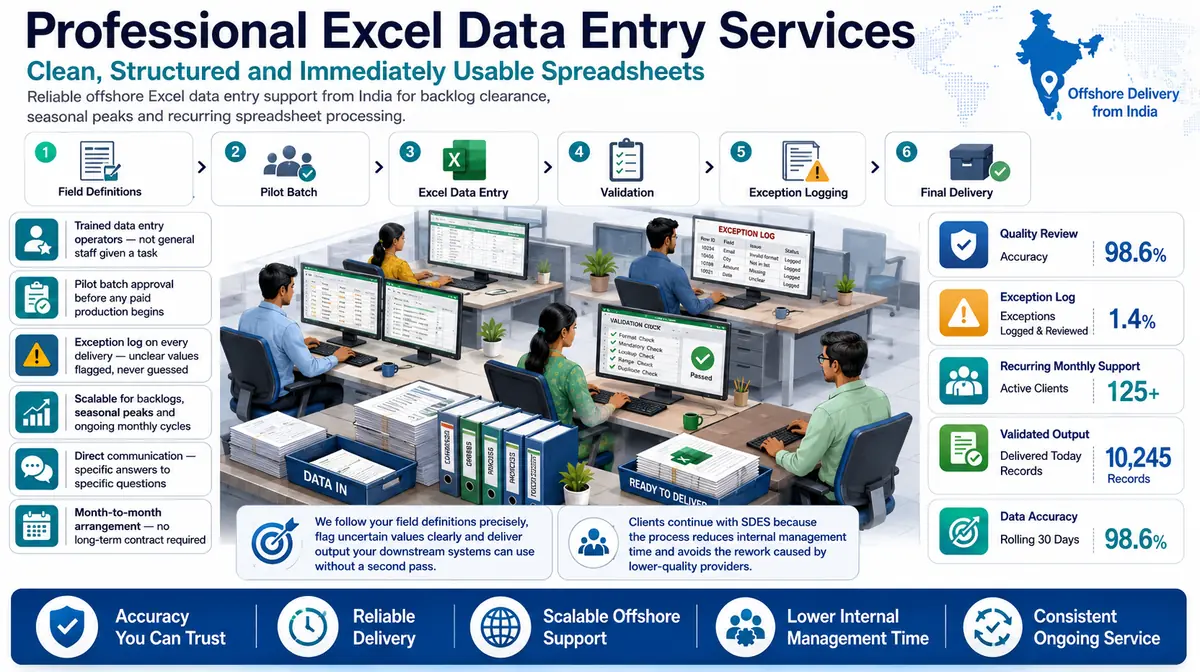

Spreadsheet production for capture, consolidation, migration and recurring maintenance

Each workbook is organised around the people or systems that will use it next.

01

Spreadsheet population

Defined fields are entered from PDFs, images, forms, reports or supplied lists into an approved workbook structure with data types preserved.

02

Workbook consolidation

Rows from multiple files or sheets are mapped to one master structure. Duplicate and conflicting records remain visible under agreed rules.

03

PDF and image to Excel

Tables and record fields are transcribed into true rows and columns rather than pasted as unstructured text. Complex layouts receive manual review.

04

Template and import-file preparation

Data is arranged for CRM, ERP, accounting, catalog or database imports using required headers, formats and controlled values.

05

Spreadsheet cleanup

Approved corrections can standardise spacing, dates, numeric representation, controlled terms and obvious structural defects without changing unsupported facts.

06

Recurring workbook maintenance

New batches, status changes and source updates are added under a version, cut-off and ownership routine designed for ongoing use.

Business System Compatibility

Excel Data Entry Services: Direct Integration and Software Compatibility

Outputs are prepared around the field structure, controlled values and import requirements of your destination environment. Files can be delivered for review, staging or authorised import without forcing your team to rebuild the completed work.

Supported destinations

Structured output for the platforms your team already uses

Files are mapped to the client’s approved template, naming rules, identifiers and system structure before full production begins.

  • Microsoft ExcelControlled worksheets and import tables
  • Google SheetsShared review and operational files
  • SharePointLists, libraries and metadata columns
  • SalesforceCRM objects and approved fields
  • ERP / CRM SystemsClient-defined import templates
  • Custom SQLStaging and relational tables
Source continuity

References stay connected

Source IDs, filenames, record keys and approved relationships remain available for review and downstream traceability.

Import control

Fields are mapped before production

Mandatory fields, formats, controlled values, character limits and relationship keys are checked against the destination specification.

Pilot validation

Test the handoff with a representative batch

Rejected rows, unsupported values and mapping conflicts are returned with exact references so approved corrections can be incorporated before full-volume delivery.

Delivery formatsStructured for review, staging or import
  • CSV
  • XLSX
  • XML

Column order, encoding, date rules, multi-value handling and destination-specific requirements can follow the receiving system’s approved specification.

Compatibility means SDES prepares outputs to specifications supplied or approved by the client. Product names identify commonly used destination systems and do not imply endorsement, certification or partnership.

Process, Quality and Security

How we build a dependable workbook

1. Confirm the Workbook Purpose

Import, tracking, review, reconciliation and analysis each require different design decisions.

2. Define Columns and Types

Headers, data types, formats, identifiers and blank-value rules are documented.

3. Protect Existing Logic

Formulas, validations, named ranges and protected areas are identified before population.

4. Test Source Variation

A sample checks tables, mixed formats, difficult documents and expected exceptions.

5. Populate and Validate

Records are entered and reviewed for field placement, format, completeness and approved relationships.

6. Deliver With Notes

The workbook arrives with exceptions, duplicate candidates and any unresolved source conflicts clearly separated.

Excel output is prepared as working data, not a visual imitation of the source

📂 Source formats we accept
  • Existing Excel workbooks
  • PDF and image sources
  • CSV and exported tables
  • Target-system templates
  • Field rules and controlled values
📤 Delivery formats
  • Structured XLSX workbooks
  • Import-ready CSV files
  • Master consolidation tables
  • Exception and duplicate sheets
  • Source and batch references
Free accuracy test

Does the spreadsheet need to be imported, analysed or maintained?

Share the source, workbook and intended next step. We will identify the structure, data types and validation rules needed before production.

✓ No credit card required✓ No contract required✓ 24–48 hour return
Discuss the Workbook
Source sampleyour_sample_data.csv
Received
Verified deliveryverified_output.xlsx
Reviewed
▣ Encrypted transfer◉ Quality controlled
Why Outsource to SDES?

Why organisations use an Excel specialist instead of treating spreadsheets as digital paper

Excel Data Entry Services workflow and quality review
  • Typed date and numeric fields
  • Identifier-safe formatting
  • Import-compatible headers
  • Formula areas protected
  • Duplicate and exception sheets
  • Offshore capacity for large workbooks

Professional spreadsheet entry protects the usefulness of the data after delivery. A workbook should sort, filter and import predictably, and an expert owner should be able to trace why a record was held. Organisations can outsource workbook population without transferring analytical authority.

Our offshore operators handle the repeatable population work, while client analysts retain formula design, interpretation and approval authority. This separation prevents a data-entry task from changing business logic and helps teams outsource recurring updates responsibly.

Start Your Project →
Industries We Support

Excel workflows designed around different kinds of records

Finance Operations

Invoice, transaction and reporting inputs prepared without changing accounting decisions.

eCommerce

Product, attribute, supplier and inventory templates built for platform import.

Logistics

Shipment, carrier and proof-of-delivery registers maintained to operational cut-offs.

Real Estate

Property, lease and portfolio records consolidated with source references.

Healthcare Administration

Approved administrative fields structured under client privacy requirements.

Research and CRM

Source-linked company, contact and market datasets prepared for review.

Case Studies

Relevant Project Experience

Supplier Workbook Consolidation

Project Name
Supplier Workbook Consolidation
Volume
15,466 files per month
Problem
Headers, units and product identifiers differed across workbooks.
Solution
Each source was mapped to a typed master table; possible matches and unsupported units stayed in review sheets.
Outcome
The model output created an import-ready table without concealing supplier conflicts.
Title
Catalog Data Analyst
Industry
Wholesale Distribution
Country
Canada

Historical Reporting Table

Project Name
Historical Reporting Table
Volume
73,920 records — completed in 3 weeks
Problem
Dates, status labels and identifiers changed between reporting periods.
Solution
Period-specific patterns were profiled before approved values were consolidated into one schema.
Outcome
The solution produced a usable table plus a period-by-period exception register.
Title
Reporting Manager
Industry
Non-Profit
Country
New Zealand

Recurring Operations Tracker

Project Name
Recurring Operations Tracker
Volume
6,739 records per month
Problem
Manual additions broke formulas and inserted inconsistent text into numeric columns.
Solution
Protected logic areas, typed entry columns and a controlled update sheet separated production from analysis.
Outcome
The professional workflow preserved workbook logic while allowing recurring offshore updates.
Title
Operations Planning Lead
Industry
Facilities Services
Country
United States
FAQs

Questions about Excel data entry

Can you preserve formulas and workbook formatting?

Yes, when the protected areas and expected behaviour are identified. Formula design and business logic remain with the authorised expert workbook owner.

Can you prepare a file for system import?

Yes. The target headers, data types, required values and import rules should be supplied or confirmed before production.

Will duplicate rows be deleted automatically?

Only under approved exact-match rules. Possible duplicates should remain in a separate review sheet.

Can Excel Data Entry Services follow our existing template or platform fields?

Yes, when the destination fields, accepted values, identifiers and permitted actions are confirmed. Delivery can be prepared as Structured XLSX workbooks, Import-ready CSV files, with unresolved records excluded from upload-ready output.

📩 Review an Excel Sample
💬