India-Based Data Entry Outsourcing Support Serving USA, Canada, UK, Australia, Europe, New Zealand, Singapore, UAE
Zoho CRM Data Entry

Zoho CRM Data Entry Services for Modules, Layouts and Relationships That Reflect Your Sales Process

Zoho CRM frequently grows alongside the business: a new layout is introduced, a custom module tracks delivery, Creator holds an operational form and a Blueprint controls how deals progress. Data prepared for the original setup may no longer fit the system now in use.

We first identify where each record belongs and what the active layout requires. Leads, contacts, accounts, deals, products and Creator forms receive separate professional field maps. Approved lookups and accepted values guide the offshore team; missing relationships are not repaired by name alone.

Clients may outsource historical migration, custom-module backlogs or day-to-day Zoho maintenance. Expert administrators keep authority over Blueprints, workflows and qualification, while SDES provides the data-entry solution for controlled module imports and traceable exceptions.

Shri Data Entry Services team working on Zoho CRM Data Entry Services projects
5000+ Completed Projects
90% Returning Clients
16+ Years Experience
45+ Countries Served
50+ Professionals Team
Services We Offer

Zoho records should follow the configured layout, relationship and process rules

  • Target module and layout confirmed
  • Mandatory and conditional fields mapped
  • Lookup relationships preserved
  • Picklist and multi-select values matched
  • Blueprint-sensitive fields identified
  • Import actions reconciled

The same field label can behave differently across Zoho modules or layouts. A source value may belong in Leads, Contacts, Accounts, Deals, Products or a custom module, and its required fields can depend on layout rules.

Relationships should be mapped before import. Contacts require the correct accounts, deals need approved contacts and products, and Creator records may depend on keys shared with CRM modules. Unsupported lookups are held rather than joined by a similar name.

Blueprints, workflows and assignment may react to field or status changes. The client identifies process-sensitive values and decides whether routine users may update them. Data entry remains separate from process design and sales judgement.
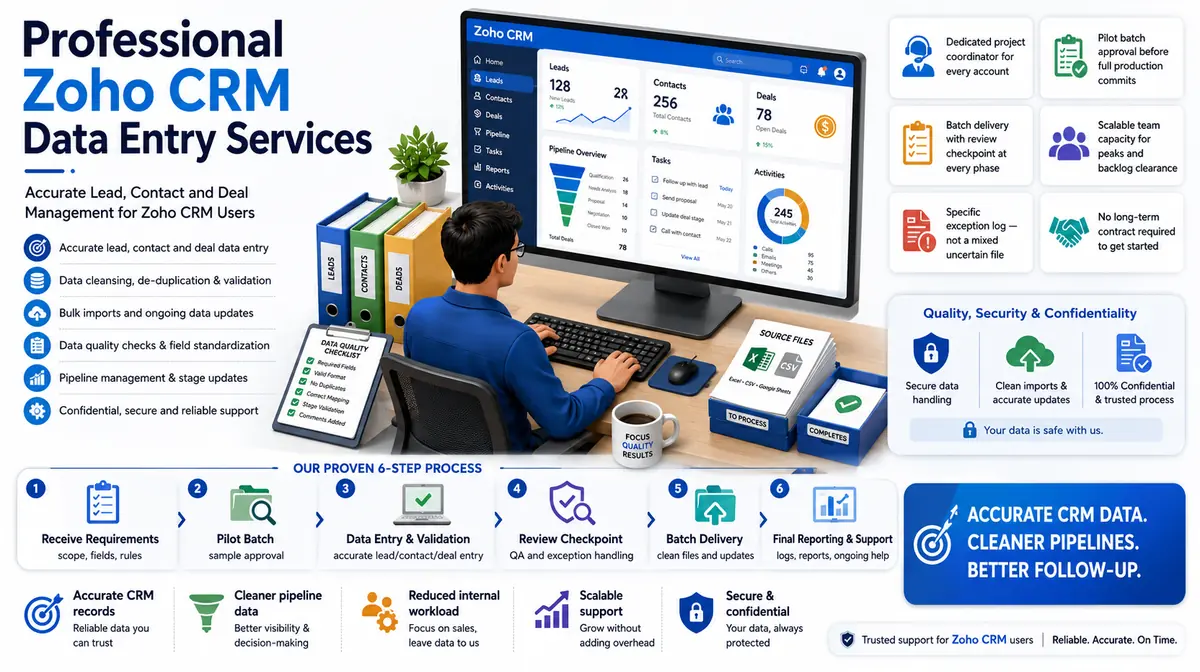

Data entry across core CRM modules, custom modules and approved Creator applications

The client’s Zoho configuration determines valid values, relationships and actions.

01

Zoho contact and account entry

People, organisations, addresses, owners and approved lookup relationships are maintained with existing-record checks.

02

Zoho lead and deal entry

Approved lead, source, deal, value, date, stage and owner fields are entered without unsupported qualification decisions.

03

Custom field and module entry

Client-defined fields and modules are populated according to layout, type, lookup and accepted-value rules.

04

Zoho bulk data import

Create and update files are structured by module, layout and identifier, with test imports reconciled before wider batches.

05

Zoho data cleansing and migration

Formats, missing relationships, invalid values and duplicate candidates are prepared for controlled migration or cleanup.

06

Zoho Creator data entry

Approved records are entered into configured Creator forms or import structures using application-specific fields and relationships.

CRM Software Compatibility

Zoho CRM Data Entry Services: Direct Integration and Software Compatibility

Outputs are prepared around the field structure, controlled values and import requirements of your destination environment. Files can be delivered for review, staging or authorised import without forcing your team to rebuild the completed work.

Supported destinations

Field-mapped records for customer and sales platforms

Files are mapped to the client’s approved template, naming rules, identifiers and system structure before full production begins.

  • SalesforceObjects, owners and custom fields
  • HubSpotContacts, companies and deals
  • Zoho CRMModules and approved layouts
  • Dynamics 365Entities and relationship keys
  • PipedrivePeople, organisations and pipelines
  • Custom CRM / SQLStaging and import tables
Source continuity

References stay connected

Source IDs, filenames, record keys and approved relationships remain available for review and downstream traceability.

Import control

Fields are mapped before production

Mandatory fields, formats, controlled values, character limits and relationship keys are checked against the destination specification.

Pilot validation

Test the handoff with a representative batch

Rejected rows, unsupported values and mapping conflicts are returned with exact references so approved corrections can be incorporated before full-volume delivery.

Delivery formatsStructured for review, staging or import
  • CSV
  • XLSX
  • JSON

Column order, encoding, date rules, multi-value handling and destination-specific requirements can follow the receiving system’s approved specification.

Compatibility means SDES prepares outputs to specifications supplied or approved by the client. Product names identify commonly used destination systems and do not imply endorsement, certification or partnership.

Process, Quality and Security

How source information becomes controlled Zoho CRM and Creator records

1. Map Modules and Layouts

Standard and custom modules, layouts, fields and relationships are documented.

2. Define Values and Owners

Accepted picklists, formats, users and lookup keys are connected to source data.

3. Identify Process Dependencies

Blueprint, workflow and assignment-sensitive fields are isolated.

4. Test Module Imports

A pilot checks creates, updates, relationships, rejected values and process effects.

5. Run Controlled Batches

Modules and actions are processed in approved order with held records separate.

6. Reconcile Zoho Results

Accepted, rejected and unexpectedly changed records are reviewed against source totals.

Zoho preparation should identify the module, layout and relationship before the row is built

A value that is valid in one module may be incomplete or inappropriate in another.

📂 Source formats we accept
  • Zoho module and field export
  • Source CRM or spreadsheets
  • Layout and picklist definitions
  • Owner references
  • Creator form structure
  • Migration and update rules
📤 Delivery formats
  • Zoho-ready import files
  • Module relationship map
  • Custom-field exceptions
  • Duplicate candidate queue
  • Import reconciliation
  • Updated approved records

Pilot records should include alternate layouts, custom lookups, restricted picklists, inactive owners, blueprint transitions and Creator relationships.

Checks cover module, layout, field type, lookup, picklist, owner, required values and relationship order. Import results are reconciled with source and rejected rows.

Profiles should restrict modules and actions to the task. Setup, workflow editing, mass deletion, export and user administration remain excluded by default.

Zoho CRM and Creator features can change and vary by configuration. Final field and import behaviour must be confirmed in the client account.

🔒 NDA Protected Before files are shared
🌐 GDPR Aware EU data handling
Defined Quality Target Confirmed by pilot
🛡️ Secure Transfer Encrypted file access
📋 Exception Log Every delivery
👥 Project Team Only Controlled access
Free accuracy test

Preparing a Zoho CRM import, cleanup or custom-module backlog?

Share a redacted module and field export, source sample, layouts and relationship rules. We will identify mapping and review requirements.

✓ No credit card required✓ No contract required✓ 24–48 hour return
Discuss Zoho CRM Data Entry
Source sampleyour_sample_data.csv
Received
Verified deliveryverified_output.xlsx
Reviewed
▣ Encrypted transfer◉ Quality controlled
Why Outsource to SDES?

Why teams outsource Zoho production entry while retaining CRM and Creator governance

Zoho CRM Data Entry Services workflow and quality review
  • Professional module-level mapping
  • Expert lookup escalation
  • Offshore capacity for bulk updates
  • Layout rules respected
  • Blueprint-sensitive fields protected
  • Client owns process and qualification

A Zoho CRM data entry solution should follow the configured modules and layouts rather than assume a standard deployment. SDES works from the client’s actual fields, relationships and accepted values.

Zoho administrators and sales owners retain configuration, blueprint, automation and commercial decisions. Our team applies approved entry rules, allowing organisations to outsource Zoho CRM data entry without transferring platform authority.

Start Your Project →
Industries We Support

Zoho records adapted to varied sales and operating models

Small and Mid-Sized Technology

Leads, accounts, contacts, deals and subscription data.

Agencies and Consulting

Prospects, clients, engagements and custom service records.

Manufacturing

Distributors, products and opportunity pipelines.

Real Estate

Enquiries, properties and custom transaction modules.

Training Providers

Organisations, programmes and learner enquiry records.

Business Services

Customers, services and Creator-based operational records.

Case Studies

Relevant Project Experience

Lead-to-Account Migration

Project Name
Lead-to-Account Migration
Volume
48,174 records — completed in 4 weeks
Problem
Source files did not distinguish converted relationships or provide reliable account lookup keys. Within Lead-to-Account Migration in United Kingdom, the missing structure made audit, migration and day-to-day retrieval slower than the client’s operational timetable allowed.
Solution
Approved identifiers supported module separation; uncertain person-company relationships entered review. For Lead-to-Account Migration in United Kingdom, confirmed identifiers controlled updates, while duplicate, ownership and relationship decisions remained with authorised CRM administrators.
Outcome
The proposed offshore workflow prepared connected Zoho modules without inventing conversion history. After completing Lead-to-Account Migration in United Kingdom, sales and service teams could use more consistent account histories without unsafe automatic merges.
Title
CRM Operations Manager
Industry
Business Services
Country
United Kingdom

Custom Module Record Build

Project Name
Custom Module Record Build
Volume
77,750 records — completed in 7 weeks
Problem
Spreadsheet fields mixed account data with custom service records and layout-specific values. During the Custom Module Record Build in Australia review, possible duplicates and inconsistent identifiers created a risk of merging separate customers or fragmenting one account history.
Solution
Modules, layouts and lookups were separated before import-ready preparation. For Custom Module Record Build in Australia, confirmed identifiers controlled updates, while duplicate, ownership and relationship decisions remained with authorised CRM administrators.
Outcome
The professional Zoho administrator received structured batches and a clear relationship exception list. After completing Custom Module Record Build in Australia, sales and service teams could use more consistent account histories without unsafe automatic merges.
Title
Business Applications Lead
Industry
Professional Services
Country
Australia

Zoho Creator Operations Queue

Project Name
Zoho Creator Operations Queue
Volume
13,187 forms per month
Problem
Creator form updates required references shared with CRM accounts and products. For the Zoho Creator Operations Queue in United States workload, channel teams had to compare supplier sources manually, slowing publication and increasing the risk of inconsistent product records.
Solution
Supported keys connected the applications, while missing references went to expert owners. Within the Zoho Creator Operations Queue in United States workflow, confirmed records moved through controlled batches, while missing, unreadable and conflicting items remained in a source-linked exception file.
Outcome
The resulting workflow maintained routine operational records without granting offshore users application-design authority. After completing Zoho Creator Operations Queue in United States, internal reviewers could focus on genuine exceptions instead of rechecking every completed record.
Title
Operations Systems Director
Industry
Distribution
Country
United States
FAQs

Questions about Zoho CRM data entry

Can custom Zoho modules and layouts be supported?

Yes, when their fields, layouts, relationships, accepted values and required conditions are documented from the client account.

Can Zoho Creator records be entered?

Yes, for approved forms and imports with a defined application structure. Application design and business rules remain with client owners.

Can blueprint stages be changed?

Only under explicit evidence and authority. Blueprint and qualification decisions remain with authorised client teams.

Can Zoho CRM Data Entry Services follow our existing template or platform fields?

Yes, when the destination fields, accepted values, identifiers and permitted actions are confirmed. Delivery can be prepared as Zoho-ready import files, Module relationship map, with unresolved records excluded from upload-ready output.

📩 Review a Zoho Sample
💬