
India-Based Data Entry Outsourcing Support Serving USA, Canada, UK, Australia, Europe, New Zealand, Singapore, UAE
HubSpot Data Entry

HubSpot Data Entry Services for Contacts, Companies, Deals and Properties That Stay Connected

In HubSpot, a contact import can affect far more than the Contacts screen. Company associations influence account context, property values affect segmentation and a lifecycle update may change workflow behaviour. An apparently clean upload can therefore create a downstream problem that is not visible in the source file.

Before production, we inspect the objects involved, accepted property types, unique identifiers and automation-sensitive fields. A professional import plan might place companies before contacts, reserve uncertain associations for review and test deal updates independently. Offshore capacity is added only after those dependencies are understood.

The client can outsource list preparation, cleansing, migration or recurring portal updates without delegating marketing and pipeline strategy. Expert owners retain lifecycle, routing and deal decisions; SDES supplies the controlled data-entry solution that keeps accepted, rejected and held records traceable.

Shri Data Entry Services team working on HubSpot Data Entry Services projects
5000+ Completed Projects
90% Returning Clients
16+ Years Experience
45+ Countries Served
50+ Professionals Team
Services We Offer

HubSpot data should support segmentation and workflows without triggering unintended actions

  • Unique identifiers confirmed
  • Contacts linked to correct companies
  • Lifecycle and lead status separated
  • Custom property types respected
  • Workflow-sensitive fields identified
  • Import results reconciled

HubSpot uses associations and properties to connect marketing, sales and service activity. A contact may exist independently, belong to a company, participate in a deal and appear in lists or workflows. Those relationships must be planned before bulk upload.

Custom properties require more than matching a column name. The target may accept dropdown options, dates, numbers, multi-select values or owner references. Unsupported labels and invalid formats are isolated before import rather than forced into the nearest-looking option.

Some properties can affect automation, lead routing, lifecycle reporting or communication. The client identifies workflow-sensitive fields and decides whether production users may update them. Routine record entry remains separate from marketing or sales strategy.
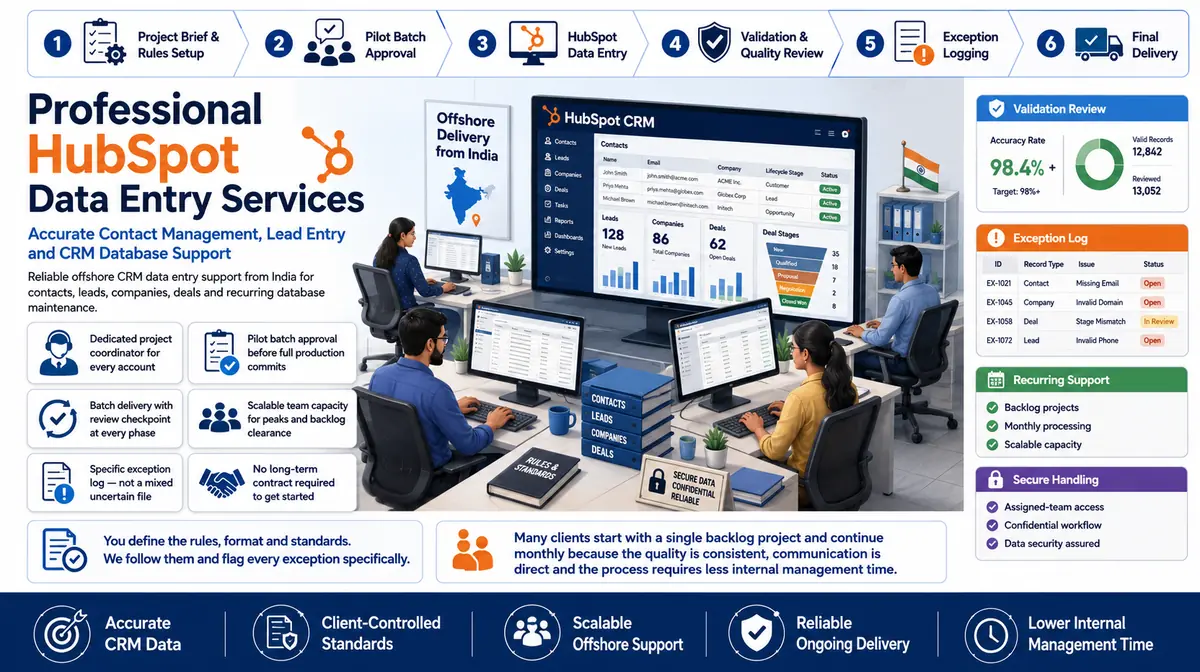

Data preparation and maintenance across contacts, companies, deals and custom properties

The portal model and automation dependencies determine how each field is handled.

01

HubSpot contact import

Contact identifiers, names, roles, consent-related client fields and source references are prepared for approved import or direct entry.

02

Company record updates

Domains, names, locations, owners and approved classifications are maintained with contact associations preserved.

03

Deal pipeline entry

Approved deal names, stages, values, dates, owners and associations are entered without unsupported forecast decisions.

04

Custom property entry

Values are mapped to the correct property type, internal option and object, with invalid or unmapped values held for review.

05

HubSpot list upload

Import files are structured for the intended object and identifier strategy, with update and create actions kept explicit.

06

HubSpot data cleansing and migration

Formats, missing associations, duplicate candidates and source-to-HubSpot mappings are prepared and reconciled.

CRM Software Compatibility

HubSpot Data Entry Services: Direct Integration and Software Compatibility

Outputs are prepared around the field structure, controlled values and import requirements of your destination environment. Files can be delivered for review, staging or authorised import without forcing your team to rebuild the completed work.

Supported destinations

Field-mapped records for customer and sales platforms

Files are mapped to the client’s approved template, naming rules, identifiers and system structure before full production begins.

  • SalesforceObjects, owners and custom fields
  • HubSpotContacts, companies and deals
  • Zoho CRMModules and approved layouts
  • Dynamics 365Entities and relationship keys
  • PipedrivePeople, organisations and pipelines
  • Custom CRM / SQLStaging and import tables
Source continuity

References stay connected

Source IDs, filenames, record keys and approved relationships remain available for review and downstream traceability.

Import control

Fields are mapped before production

Mandatory fields, formats, controlled values, character limits and relationship keys are checked against the destination specification.

Pilot validation

Test the handoff with a representative batch

Rejected rows, unsupported values and mapping conflicts are returned with exact references so approved corrections can be incorporated before full-volume delivery.

Delivery formatsStructured for review, staging or import
  • CSV
  • XLSX
  • JSON

Column order, encoding, date rules, multi-value handling and destination-specific requirements can follow the receiving system’s approved specification.

Compatibility means SDES prepares outputs to specifications supplied or approved by the client. Product names identify commonly used destination systems and do not imply endorsement, certification or partnership.

Process, Quality and Security

How source data becomes controlled HubSpot records

1. Map HubSpot Objects

Contacts, companies, deals and custom objects are connected to source entities and relationships.

2. Inspect Properties and Options

Types, internal values, requirements and workflow-sensitive fields are documented.

3. Choose Identifiers

Email, domain, record ID or another approved key is selected for create and update actions.

4. Test Associations and Imports

A sample checks duplicates, invalid properties, owner references and object connections.

5. Run Controlled Batches

Create, update and held records remain separate and import results are captured.

6. Reconcile Portal Results

Accepted, rejected and unexpectedly changed records are reviewed before the next batch.

A HubSpot import needs a deliberate identifier and association strategy

The file should state what will be created, what will be updated and how related objects will connect.

📂 Source formats we accept
  • HubSpot property export
  • Contact and company files
  • Deal or activity records
  • Owner lists
  • Pipeline definitions
  • Migration and import rules
📤 Delivery formats
  • HubSpot-ready import files
  • Association map
  • Custom-property exception list
  • Duplicate candidate queue
  • Import reconciliation
  • Updated approved records

Pilot data should include existing contacts, shared company domains, custom dropdowns, missing owners and records likely to trigger workflows.

Checks cover object, identifier, association, property type, internal option, owner and required fields. Successful upload counts are reconciled with source and rejected records.

Portal roles can restrict object and action access. Workflow editing, bulk deletion, export, user administration and communication functions remain excluded unless specifically required.

HubSpot is a third-party platform whose features can change. Final import and permission behaviour should be confirmed in the client portal before production.

🔒 NDA Protected Before files are shared
🌐 GDPR Aware EU data handling
Defined Quality Target Confirmed by pilot
🛡️ Secure Transfer Encrypted file access
📋 Exception Log Every delivery
👥 Project Team Only Controlled access
Free accuracy test

Planning a HubSpot import, cleanup or recurring update queue?

Share a redacted property export, sample source file and the objects or workflows affected. We will map identifiers, associations and review points.

✓ No credit card required✓ No contract required✓ 24–48 hour return
Discuss HubSpot Data Entry
Source sampleyour_sample_data.csv
Received
Verified deliveryverified_output.xlsx
Reviewed
▣ Encrypted transfer◉ Quality controlled
Why Outsource to SDES?

Why teams outsource HubSpot record maintenance while retaining automation and pipeline control

HubSpot Data Entry Services workflow and quality review
  • Professional property-level mapping
  • Expert association review
  • Offshore capacity for bulk and recurring updates
  • Workflow-sensitive fields identified
  • Create and update actions separated
  • Client owns lifecycle and deal decisions

A HubSpot data entry solution should preserve the connections that lists, automation and reporting depend upon. SDES prepares records around the client’s properties and associations, then isolates values the portal cannot accept safely.

Marketing and sales owners retain lifecycle, automation, routing and commercial authority. Our team applies approved data rules, allowing businesses to outsource HubSpot CRM data entry without delegating campaign or pipeline strategy.

Start Your Project →
Industries We Support

HubSpot records adapted to different acquisition and service models

SaaS and Technology

Contacts, companies, deals, lifecycle and subscription context.

Agencies

Prospects, clients, services and campaign-related records.

Education

Programme enquiries, organisations and approved lifecycle data.

Manufacturing

Accounts, distributors, products and long-cycle deals.

Property Services

Enquiries, companies and appointment or opportunity records.

Business Finance

Approved contact and activity data without advice authority.

Case Studies

Relevant Project Experience

Contact and Company Association Repair

Project Name
Contact and Company Association Repair
Volume
32,225 records — completed in 11 weeks
Problem
Contacts existed without company links, while shared and personal email domains prevented automatic matching. During the Contact and Company Association Repair in United States review, possible duplicates and inconsistent identifiers created a risk of merging separate customers or fragmenting one account history.
Solution
Approved company evidence and record identifiers supported associations; uncertain relationships stayed in review. During production for Contact and Company Association Repair in United States, the clean import file was separated from uncertain matches and records requiring account-owner direction.
Outcome
The proposed offshore process improved segmentation without creating unsupported company connections. After completing Contact and Company Association Repair in United States, sales and service teams could use more consistent account histories without unsafe automatic merges.
Title
Marketing Operations Manager
Industry
SaaS
Country
United States

Custom Property Migration

Project Name
Custom Property Migration
Volume
15,419 records — completed in 12 weeks
Problem
Source labels did not match HubSpot dropdown options and several dates used incompatible formats. Within Custom Property Migration in United Kingdom, the resulting uncertainty weakened segmentation and made routine follow-up more dependent on manual verification.
Solution
Property types and internal options were mapped, with unmapped values returned before import. For Custom Property Migration in United Kingdom, confirmed identifiers controlled updates, while duplicate, ownership and relationship decisions remained with authorised CRM administrators.
Outcome
The professional migration owner received import-ready batches and a focused exception list. As a result of the Custom Property Migration in United Kingdom workflow, recurring maintenance became easier to govern because each update followed the same identity and field-authority rules.
Title
CRM Migration Lead
Industry
Professional Services
Country
United Kingdom

Deal Pipeline Backlog

Project Name
Deal Pipeline Backlog
Volume
5,371 records per month
Problem
Approved sales notes were not reflected consistently in deal records and associations. Within Deal Pipeline Backlog in Australia, the resulting uncertainty weakened segmentation and made routine follow-up more dependent on manual verification.
Solution
Evidence rules supported stage-related field preparation while actual stage decisions remained with expert sales owners. Within the Deal Pipeline Backlog in Australia workflow, source-to-field rules were documented so contacts, organisations, activities and statuses entered the correct CRM objects.
Outcome
The resulting workflow made routine updates visible without allowing the offshore team to forecast deals. Following delivery for Deal Pipeline Backlog in Australia, cRM administrators received a clean import file plus a focused queue for duplicates, ownership questions and unsupported relationships.
Title
Revenue Systems Director
Industry
Business Software
Country
Australia
FAQs

Questions about HubSpot data entry

Can contacts be imported without creating duplicates?

Identifiers and existing records can be reviewed before import, but duplicate behaviour depends on object and portal configuration. Candidate records and test imports should be assessed first.

Can custom properties be populated?

Yes, when the object, property type and accepted internal values are known. Unsupported labels are returned instead of forced into an inaccurate option.

Can deal stages be updated directly?

Only under approved evidence and transition rules. Forecasting, qualification and commercial decisions remain with authorised sales owners.

Which items are held for client review during HubSpot Data Entry Services?

For HubSpot Data Entry Services, anything that cannot be read confidently — conflicting identifiers, unsupported classifications, decisions outside the approved guide — is held apart from clean CRM records and platform relationships rather than guessed. Held items keep their source reference for the authorised reviewer.

📩 Review a HubSpot Sample
💬